


1.5.1 ROS Launch files
Course subject(s)
Module 1. ROS Essentials

Launching lots of ROS nodes often takes a lot of time, and a lot of terminals. Is there a better way to go about this? This lecture, we will take a look at ROS launch files.
Up until now, whenever we wanted to test our ROS nodes, we had to open up many new terminal files to run all the components. For larger packages, this gets unwieldy really fast. This is where ROS launch files come in. This way, we can start all our ROS nodes together in one terminal.
The idea is to group ROS nodes in one file. The code for the nodes themselves is still in separate files, but we link them in one launch file, which we can launch with a single command. It also allows for passing arguments, node specific parameters, and namespaces. They allow for much more, but for now, we will focus our attention on the arguments and parameters.
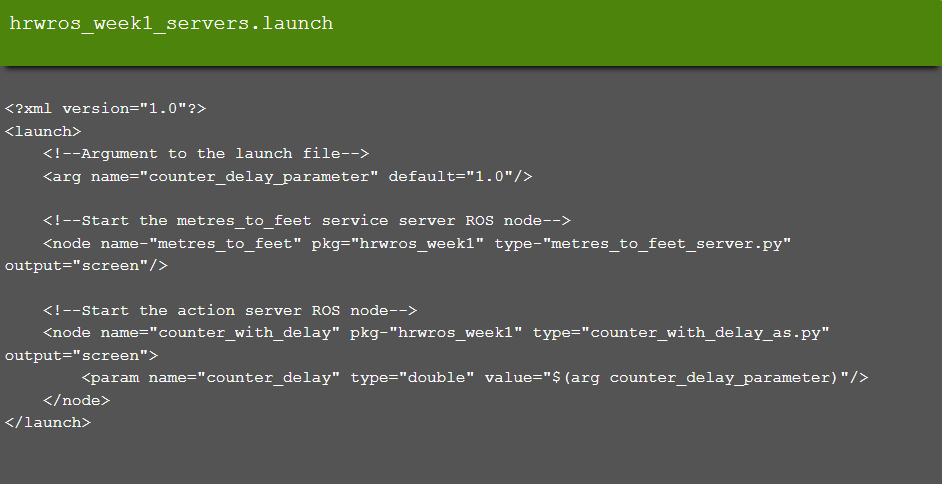
Launch files are located in the launch folder within a ROS package. It is common practice to follow a naming convention of <package_name>_<file_name>.launch, e.g. hrwros_week1_servers.launch.
Let’s look at a small example. You can see how the different nodes are started, and how the action server uses a parameter to launch.

Hello (Real) World with ROS - Robot Operating System by TU Delft OpenCourseWare is licensed under a Creative Commons Attribution-NonCommercial-ShareAlike 4.0 International License.
Based on a work at https://online-learning.tudelft.nl/courses/hello-real-world-with-ros-robot-operating-systems//.