3.4.3 Start your assessment plan
Course subject(s)
3. Plan your course design
Goal
In this activity, you will create an assessment plan for your online course, based on the assessment/s you thought of in your storyboard. This plan will help you to get an overview of the assessment you need to set up in your online course.
Description
Assessment is a key part of any course: it allows instructors to check students’ progress and the learner’s understanding of course concepts and their ability to use course skills.
Assessment is often students’ priority, as they are generally focused on their grades and ability to succeed in their study programmes. Good assessment builds on course activities and checks that all course learning objectives have been met, in accordance with constructive alignment.
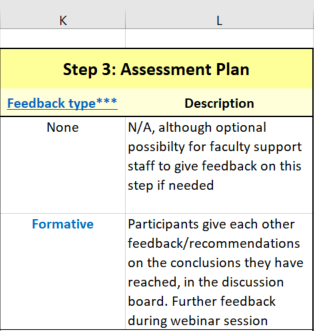
In this activity you will fill in Step 3 in the course design template:
Task
- Open your course design template from the storyboarding activity.
- Identify which learning activities in Column B include assessment, whether formative (given during an activity; includes observations, tips and suggestions on the student’s work, process and study skills) or summative (given at the end of an activity; a grade)
- Fill in the following columns:
- K: select whether the assessment is formative or summative in the drop-down menu
- L: a detailed description of the assessment, how it will be carried out and what resources you will need to find or create for it

Blending your Education by TU Delft OpenCourseWare is licensed under a Creative Commons Attribution-ShareAlike 4.0 International License.
Based on a work at https://digitelpro.eadtu.eu/course-programmes/blended-education/